The learning image browser
The learning image browser was built as a project for the class
Learning
Strategies for Intelligent Agents, taught by Henry
Lieberman and David
Maulsby, at the MIT Media laboratory.
Overview
Large image databases with millions of images are being built. It is
very tedious to browse these databases; the user will only have time
to see a small fraction of the images. Currently, there are very few
tools that assist the user in finding the right selection of
images.
This project combines learning algorithms and machine vision
techniques to create a flexible and powerful image browser. The user
is presented with a selection of images. They select positive and
negative examples of the type of images they want to see or avoid
seeing. The browser analyzes the examples and chooses the best
search metrics. It then uses these metrics to find images similar to
the examples. The results form a hierarchy that the user can browse
with a tree browser. Next, the user selects more positive and negative
examples, and the process repeats.
Goals
The goals of this project are to build an intelligent system for
browsing large image databases. We believe that such a system should
be:
- Interactive. Usually, the user wants to
interactively browse
the database. The system enhances the browsing experience by
inferring the user's interests, and presenting the relevant
parts of the database, organized according to the user's tastes.
As a consequence, the system must offer real time query performance.
- Based on examples. The natural way to specify
an image database query is to give examples of images that have
the desired properties.
- Adaptive. No two users are alike; their idea
of what images are similar will differ. Similarity may also
vary over time for a single user. At one time, color may be a
very important attribute, only to become largely irrelevant at a
different time. Moreover, no two sets of images are alike;
algorithms which work well on one set may fail on another.
Hence, the system cannot rely on a fixed, preset search metric.
Instead, the system should adapt to the current user and the
current set of images.
- Transparent to the user. The system must
make it evident to the user how it selects images, and
communicate what it has learned from the user.
The goals and techniques discussed here are also applicable to many other
database and information retrieval tasks.
The system
The system has three major components: the machine vision module, the
learning module, and the hierarchical image browser.
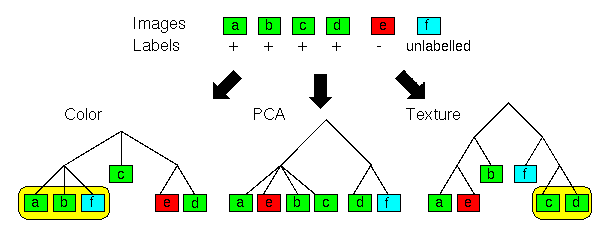
Figure 1: Images are clustered into color, texture
and principal components hierarchies.
The user selects positive and negative examples of desired images.
The system learns what hierarchies are useful (in this case, the color
and texture hierarchies are relevant).
Machine Vision Module
The system currently uses three machine vision algorithms to analyze
the image content.
- Color histograms. For each image, a 768 bin histogram measures
the distribution of colors in the Ohta color space. Two histograms
are compared using a Euclidean distance metric.
- Texture. A multi-resolution autoregressive texture model
(MRSAR) characterizes the patterns of pixels in the image.
- Principal component analysis. Each image is projected onto a
subspace defined by the 100 largest eigenvectors of a training
set of images. This captures bright and dark blobs in
the image.
Each of these algorithms produces a feature vector for every image.
These feature vectors are clustered using a hierarchical clustering
algorithm. The result is 3 trees. The leaves of the trees
correspond to individual images in the database, whereas internal
nodes correspond to groups of images. The closer two images are in
the trees, the more similar they are.
The image database consists of 322 paintings and sculptures by Picasso.
Learning Module
The input to the learning algorithm is a set of trees. The user
clicks on images and specifies whether they are positive or negative
examples. The learning algorithm attempts to find tree parts that
match these positive and negative examples. The output of the
algorithm is a set of covers. A cover is a leaf or node that
has positive examples in its subtree, but no negative examples. The
images in the subtrees of the covers are likely to be images similar
to what the user specified.
The learning algorithm finds a set of covers that cover all positive
examples. It optimizes the following criteria (the first criterion
has priority).
- A cover should have as many positive examples as possible in
its subtree, without including any negative examples. This
ensures that the minimum number of covers result.
- A cover should have as few unlabeled nodes as possible in its subtree.
Note that the covers can come from different trees; this is desirable
because different examples are clustered the best by different
machine vision algorithms. This learning algorithm is described in
more detail in reference [1].
Hierarchical image browser
The browser gets a set of covers from the learning module. Each cover
has a corresponding group of images from its subtree. The images from
each cover are displayed in a separate window. Since the cover
defines a subtree, the browser is hierarchical and lets the user
navigate the corresponding tree. The user can easily move up and down
from any node, and see multiple levels of the tree simultaneously.
Note that images are only stored at the leaves of the tree. Thus, to
display an internal node, the browser selects a representative subset
of the leaves parented by the node. Currently, the leaves are selected
randomly, but in the future, we plan to use images that have been
rated to be the most liked in their group.
Below is a snapshot of the browser in action.
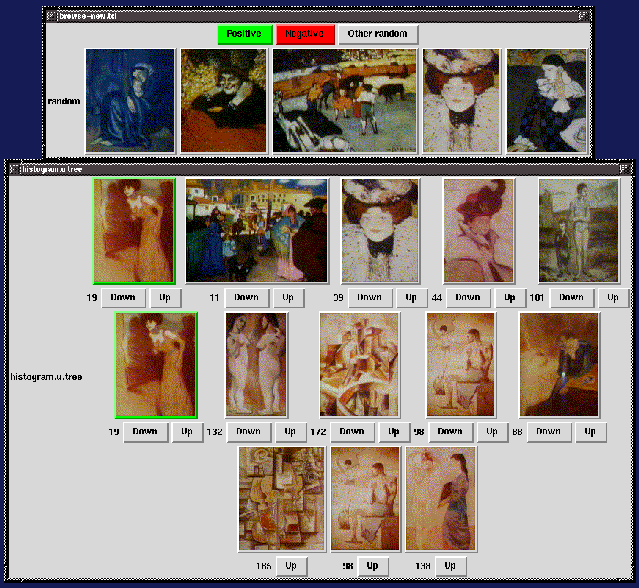
The top window shows some randomly selected images, used during the
initial phase of the browsing. The bottom window shows a cover based
on two positive examples. The system determined that the color
histogram tree was the best metric for these examples. The positive
examples have green frames. The bottom row shows the closest leaves,
and indeed they have very similar colors. The middle and top row come
from further away in the tree, and so are less similar.
Future Work
Future work includes:
- Including more machine vision algorithms. The learning system is very
general and can accept any algorithm that can present its result
in terms of a tree. This is especially geared towards clustered
feature vectors.
- Including other knowledge about the images. The image database
includes text annotations that describe groups of images. For
example, there is the group of images that all painted in 1901,
and there are several annotations describing the style of the
paintings (e.g. analytic cubism, synthetic cubism, the blue era).
- Selecting more representative images for internal nodes.
Subjective Image Query
Another future project involves subjective image query. We are interested in finding out what qualities
people like in images, and whether it is possible to learn them.
Related Work
Two related image retreival systems are Photobook
and its learning agent FourEyes,
developed by Tom
Minka.
References
[1] R.W. Picard and
T. P. Minka . Vision Texture for Annotation.
Journal of Multimedia Systems, 1995,
Vol. 3, pp. 3-14. ACM/Springer-Verlag. Also appeared as
TR #302.
Martin
Szummer,
szummer@media.mit.edu.NOSPAM(remove the .NOSPAM suffix before
sending)
Last modified: Mon May 5 19:39:02 EDT 1997